Rugged Laptops & Tablets for Automotive Diagnostics, Repair & Tuning
Automotive mechanics and technicians need rugged laptop and tablets that can run diagnostic software tuning, connect to vehicles and equipment, and perform reliably across service bays, roadside calls, and demanding field environments.
What Is the Best Rugged Laptop for Automotive Diagnostics and Repair?
The best rugged laptop for automotive diagnostics and repair can reliably run diagnostic software, connect with vehicle systems and peripherals, and withstand the conditions mechanics and technicians encounter in service centers and field environments. Unlike a standard consumer laptop, it should also support frequent handling, vibration, dust, moisture, temperature changes, and mobile use while delivering the processing power, connectivity, and battery performance needed to keep work moving.
When evaluating rugged laptops and tablets for automotive diagnostics and repair, look for:
- Relevant MIL-STD testing and IP-rated protection for drops, vibration, dust, water, and temperature extremes
- Diagnostic software and application compatibility for the tools technicians and mechanics rely on
- Reliable access to diagnostic information, including codes, repair procedures, manuals, and system data
- Ports and wireless connectivity for vehicles, equipment, and diagnostic tools
- Durable construction for rough handling, weather, dirt, dust, grease, and demanding temperatures
- Displays and touchscreens designed for shop, outdoor, wet, and gloved use
- Long battery life and power options for extended service calls
- Docks, mounts, and accessories that support shop, field, and in-vehicle workflows
- Proven reliability and support, including warranty coverage, repair services, and deployment assistance
How Do Rugged Laptops Support Automotive Diagnostics, Repair, and Tuning?
Rugged laptops and tablets help technicians and mechanics access the software, diagnostic data, repair information, and communication tools they need to keep work moving. Whether diagnostics happen in a service bay, on the roadside, or at a jobsite, rugged devices need to support the workflow without slowing mechanics down.
Rugged devices can help mechanics, technicians, and fleet teams:
- Connect to vehicles, equipment, and diagnostic tools
- Access fault codes, service manuals, repair procedures, and system data
- Capture inspection notes, photos, and repair documentation
- Share information across mechanics, service centers, and fleet teams
- Keep diagnostics and repair moving in shop, field, and mobile environments
- Access vehicle performance data and software used for tuning workflows
Automotive Service Centers and Repair Bays
In service centers, rugged laptops and tablets help mechanics move between vehicles, bays, workstations, and shop systems without being tied to a fixed desktop.
They can support:
- Vehicle diagnostics and troubleshooting
- Access to repair procedures, service manuals, and technical data
- Communication between mechanics, technicians, service advisors, and parts teams
- Documentation for inspections, service records, and repair orders
- Daily use around dust, fluids, grease, tools, and frequent handling
Field Service and Roadside Diagnostics
Field service adds more variables to the diagnostic process. Mechanics and technicians may need to troubleshoot vehicles away from a controlled repair facility, where power, connectivity, weather, and workspace conditions can be less predictable.
Rugged laptops and tablets can help support:
- Roadside diagnostics and mobile repair
- Access to diagnostic software and repair information from the field
- Wireless connectivity for sharing updates and service data
- Outdoor visibility and touch functionality in changing conditions
Heavy Equipment Diagnostics and Repair
Many of the same diagnostic needs apply to heavy equipment, where mechanics may service machinery in repair facilities, yards, jobsites, and other demanding environments.
Rugged computers can help mechanics and technicians:
- Diagnose issues at or near the equipment
- Access equipment data, repair information, and service history
- Support construction, agricultural, industrial, and other heavy-equipment applications
- Reduce the need to move machinery back to a central service location
- Work around dirt, dust, vibration, weather exposure, and rough handling
Fleet Maintenance Operations
For organizations managing multiple vehicles, pieces of equipment, mechanics, and service locations, rugged diagnostic technology can support a more consistent maintenance workflow.
Rugged laptops and tablets can help fleet teams:
- Standardize diagnostic tools across mechanics and locations
- Support both automotive and heavy-equipment maintenance
- Improve access to vehicle, equipment, and repair data
- Help reduce delays caused by device failures or limited access to information
- Support field and service-center teams using a shared technology platform
What Does Ingress Protection (IP) Mean?
Ingress protection, or IP, ratings define how well a device enclosure resists dust, water, and other outside elements. Rather than relying on broad terms like “waterproof” or “dustproof,” IP ratings provide a standardized way to evaluate how protected a rugged laptop or tablet is against solids and liquids.An IP rating includes two numbers:
IP65 example
|
IP |
6 |
5 |
|
Ingress protection rating |
Solid protection |
Liquid protection |
In this example, IP65 means the device is dust-tight and protected against water jets from any direction.
First numeral: resistance to solid objects | Second numeral: resistance to water
|
Number |
Protection level |
Number |
Protection level |
|
0 |
No protection |
0 |
No protection |
|
1 |
Protected against solid foreign objects of 50 mm and greater |
1 |
Protected against vertically falling water drops |
|
2 |
Protected against solid foreign objects of 12.5 mm and greater |
2 |
Protected against vertically falling water drops when the device enclosure is tilted up to a 15° angle |
|
3 |
Protected against solid foreign objects of 2.5 mm and greater |
3 |
Protected against water sprayed at a 60° angle |
|
4 |
Protected against solid foreign objects of 1.0 mm and greater |
4 |
Protected against water splashed from any direction |
|
5 |
Dust-protected |
5 |
Protected against water jets from any direction |
|
6 |
Dust-tight |
6 |
Protected against powerful water jets from any direction |
|
7 |
Protected against temporary immersion in water |
||
|
8 |
Protected against continuous immersion in water |
||
|
9 |
Protected against high-pressure, high-temperature water jets |
6 Procurement Questions for Evaluating Rugged Diagnostic Hardware
-
01
Was the rugged device tested for real shop and field conditions?
Look for relevant MIL-STD testing, IP-rated protection, and certification reports that show how the device performs against drops, vibration, dust, water, temperature changes, and frequent handling. -
02
Does it support the software technicians and mechanics rely on?
Confirm compatibility with the diagnostic, repair, tuning, and service applications your teams use today—and understand how the device can support evolving software requirements over time. -
03
Can it connect to the vehicles, equipment, and tools in your workflow?
Evaluate physical ports, wireless connectivity, diagnostic interfaces, adapters, peripherals, and access to shop systems or remote support resources. -
04
Will the rugged device be usable where the work happens?
Consider display visibility, touchscreen performance, glove or wet-touch operation, battery life, vehicle power, docks, mounts, and accessories for service bays, roadside calls, jobsites, and in-vehicle workflows. -
05
What is the documented annual failure rate?
Ask for real-world reliability data, not just ruggedness claims. Lower failure rates can help reduce downtime, spare-device needs, IT workload, and delays to vehicle or equipment repairs. For example, TOUGHBOOK rugged laptops and tablets have an overall annualized failure rate of 0.61%.*
*Based on internal Panasonic Connect data collected over the past five years
-
06
What is the deployment and lifecycle support model?
Confirm available support for imaging, kitting, software setup, vehicle installation, warranty coverage, repair, replacement, and long-term device management across mechanics, locations, and fleet operations.
What Should Technicians and Mechanics Look for in Rugged Laptops for Automotive Diagnostics and Repair?
The right rugged laptop or tablet should do more than survive demanding conditions. It should support the software, connectivity, usability, and power requirements technicians and mechanics rely on to diagnose issues, access information, and complete repairs efficiently.
When comparing rugged laptops and tablets, consider how each device supports the full diagnostic workflow—from connecting to vehicles and equipment to accessing data, documenting work, and staying productive across shop and field environments.
-
Automotive diagnostics depend on software. Technicians and mechanics need rugged computers that can run the applications, operating systems, and technical resources required for the vehicles and equipment they service.
Key considerations include:
- Compatibility with current diagnostic software and applications
- Processing power to support data-heavy tools and multitasking
- Storage for service information, reports, images, and technical files
- Support for evolving software requirements over the device lifecycle
- Reliable access to diagnostic codes, repair procedures, manuals, and system data
-
A rugged diagnostic laptop should connect easily with the tools, systems, and equipment mechanics use every day. That includes both physical ports and wireless connectivity for shop, field, and in-vehicle workflows.
Look for support for:
- Vehicle and equipment diagnostic interfaces
- USB, Ethernet, serial, and other required port options
- Wi-Fi, Bluetooth, and cellular connectivity
- Diagnostic adapters, scanners, printers, and other peripherals
- Stable access to shop systems, service platforms, and remote support resources
-
Automotive and heavy-equipment environments can be hard on technology. Rugged laptops and tablets should be built to withstand the real-world conditions mechanics face in service bays, yards, vehicles, jobsites, and roadside settings.
Important durability factors may include:
- Protection against drops, vibration, and frequent handling
- Resistance to dust, dirt, grease, moisture, and water exposure
- Performance in hot, cold, and changing temperatures
- Relevant MIL-STD testing and IP-rated protection
- Durable construction that supports both service-center and field use
-
Mechanics and technicians often need to view and enter information while moving around vehicles, working outdoors, or wearing gloves. The device should be easy to read, carry, mount, and use in the environments where diagnostics and repairs happen.
Usability features to consider include:
- Bright displays for service bays and outdoor visibility
- Touchscreens designed for wet or gloved use
- Keyboard and input options for longer notes or reports
- Portability for moving between vehicles, bays, and field locations
- Form factors that fit the way mechanics actually work
-
Diagnostic work does not always happen near a power outlet. Mechanics working across service bays, roadside calls, fleet yards, and jobsites need rugged laptops and tablets that can stay powered through extended tasks and changing locations.
Power considerations include:
- Battery life that supports long shifts and service calls
- Replaceable or hot-swappable battery options
- Vehicle power and charging accessories
- Power continuity during longer diagnostic procedures
- Charging options that support shop, field, and in-vehicle workflows
-
Different mechanics, vehicles, and service environments may require different setups. Rugged laptops and tablets should be configurable enough to support a range of diagnostic workflows without forcing every user into the same setup.
Helpful options may include:
- Vehicle docks and mounting solutions
- Desktop docks for service centers and repair bays
- Configurable ports, storage, keyboards, and accessories
- Accessories that support field service and in-vehicle use
- Flexible configurations for automotive, heavy-equipment, and fleet maintenance teams
Does Reliability Matter When Choosing a Rugged Laptop or Tablet for Automotive Diagnostics and Repair?
-
Annual Failure Rates and Downtime
When a diagnostic laptop fails, work can slow down or stop. Technicians and mechanics may lose access to diagnostic software, repair information, service records, and communication tools needed to complete the job.
That is why buyers should look beyond the initial device price and ask about real-world reliability.
Key considerations include:
- Documented annual failure-rate data
- Downtime caused by device repairs or replacements
- The cost of spare devices and backup equipment
- Delays to vehicle or equipment repairs
- The impact of device failures on mechanic productivity
-
Deployment and Device Management
For organizations supporting multiple technicians and mechanics, locations, or fleet operations, rugged laptops and tablets need to be easy to deploy, configure, manage, and support.
Strong deployment and device-management planning can help teams:
- Standardize devices across service centers, field teams, and fleet locations
- Configure devices for required software, security, and user access
- Support software updates and application changes
- Reduce the workload on internal IT teams
- Keep mechanics equipped with the tools and information they need
-
Repair, Replacement, and Lifecycle Support
The right rugged device strategy should account for what happens after deployment. Repair services, warranty coverage, replacement options, and long-term support can all affect how quickly mechanics get back to work if something goes wrong.
Support considerations include:
- Warranty and accidental-damage coverage
- Repair and replacement timelines
- Availability of replacement parts and accessories
- Support for device imaging, kitting, and deployment
- Long-term service options that help extend device value over time
TOUGHBOOK: The Industry Standard in Rugged Computing for Automotive Diagnostics and Repair
Panasonic TOUGHBOOK® rugged laptops and tablets are designed to support the way mechanics work—across service bays, field environments, fleet operations, and heavy-equipment applications.
With rugged designs, flexible configurations, and services that support deployment through replacement, TOUGHBOOK helps automotive and equipment repair teams keep diagnostics moving.
Built for Service Bays and Field Environments
Automotive and heavy-equipment work can expose technology to vibration, dust, moisture, temperature changes, grease, drops, and frequent handling.
TOUGHBOOK rugged laptops and tablets are built to help mechanics stay productive in demanding environments, including:
- Dealerships, garages, and repair bays
- Fleet maintenance facilities
- Roadside service calls
- Construction sites, yards, and outdoor environments
- In-vehicle and field-service workflows
Configured for Diagnostic Workflows
Different diagnostic and repair teams need different device setups. TOUGHBOOK rugged computers can be configured with the performance, connectivity, ports, docks, mounts, and accessories needed to support a range of automotive and heavy-equipment workflows.
Available options may support:
- Diagnostic software and service applications
- Connections to vehicles, equipment, and peripherals
- Shop, field, and in-vehicle use
- Desktop and vehicle docking
- Extended battery and charging needs
- Automotive, heavy-equipment, and fleet maintenance teams
Designed for Long-Term Reliability
Reliable technology helps mechanics spend less time waiting on replacement devices and more time diagnosing, repairing, and returning vehicles or equipment to service.
TOUGHBOOK rugged laptops and tablets are designed for long-term reliability, helping organizations:
- Reduce disruption from device failures
- Support mechanic productivity
- Minimize downtime across service and field teams
- Manage repair and replacement planning
- Evaluate total cost of ownership over the device lifecycle
Support from Deployment Through Replacement
Panasonic Connect supports rugged device programs beyond the hardware with services designed to simplify planning, deployment, installation, protection, and long-term support.
TOUGHBOOK ProServices includes:
- Device imaging, kitting, and deployment support
- Vehicle installation and mounting services
- Warranty and accidental-damage coverage
- Repair and replacement support
- Lifecycle services that help teams manage devices across mechanics, locations, and fleet operations
TOUGHBOOK Rugged Laptops & Tablets for Automotive Diagnostics & Repair
Explore TOUGHBOOK rugged laptops and tablets for automotive diagnostics and repair or connect with an expert to discuss your program requirements.
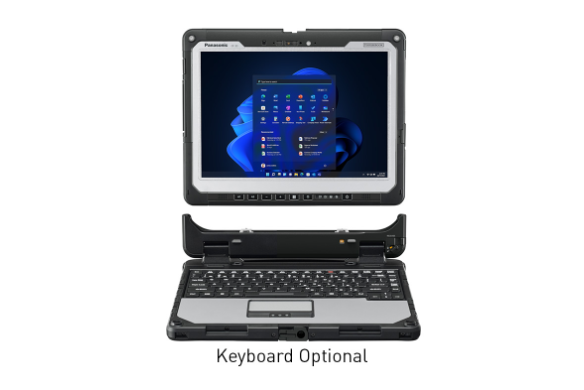
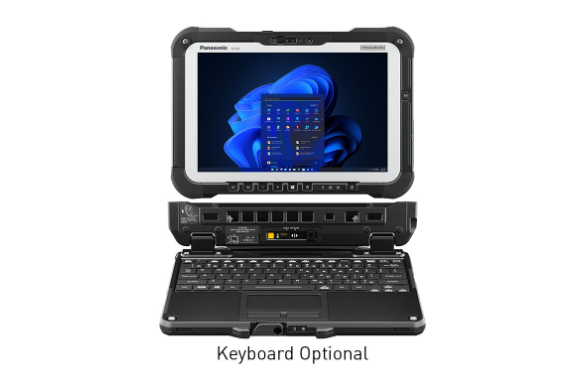
TOUGHBOOK 40
Model: FZ-40TOUGHBOOK 33
Model: CF-33TOUGHBOOK G2
Model: FZ-G2Automotive Diagnostic Laptop and Tablet FAQs
-
Yes, when they are configured to support the software, operating system, processing, storage, and connectivity requirements of the diagnostic applications technicians and mechanics rely on.
Before selecting a rugged laptop or tablet, confirm compatibility with the diagnostic software, vehicle interfaces, adapters, and service platforms your team uses.
-
Consumer laptops are not typically designed for the conditions mechanics face in service bays, roadside environments, fleet yards, or heavy-equipment jobsites.
Rugged laptops and tablets are built to better withstand frequent handling, vibration, dust, dirt, moisture, temperature changes, and mobile use while supporting the diagnostic workflows mechanics need to keep repairs moving.
-
Yes. MIL-STD testing and IP ratings can help buyers understand how a rugged laptop or tablet is designed to perform under physical and environmental stress.
For automotive diagnostics and repair, these ratings may help evaluate protection against drops, vibration, dust, water, temperature changes, and other conditions common in shop and field environments.
-
For field diagnostics and repair, mechanics need rugged laptops and tablets that can support work away from a controlled service-center environment.
Important features may include:
- Reliable wireless connectivity
- Long battery life
- Vehicle power and charging options
- Outdoor-readable displays
- Touchscreens for wet or gloved use
- Durable construction for drops, vibration, dust, moisture, and temperature changes
- Docks, mounts, and accessories for in-vehicle or field use
-
The best laptop for heavy-equipment diagnostics is one that can run required diagnostic software, connect to equipment systems, and perform reliably in both service-center and field environments.
Because heavy-equipment work may happen in yards, jobsites, outdoor areas, or remote locations, mechanics should look for rugged laptops and tablets with strong durability, reliable connectivity, long battery life, and displays that remain usable in changing conditions.
-
Both terms are widely used in the industry. “Mechanic” is often the more familiar and commonly searched term, while “technician” can reflect the increasing role of software, electronics, and diagnostic systems in modern vehicle repair.
For automotive diagnostics and repair, both mechanics and technicians need devices that can connect to vehicles, run diagnostic applications, access service information, and support work across shop and field environments.
-
Annual failure rate helps buyers understand how often devices may require repair or replacement over time. A lower failure rate can help reduce downtime, spare-device needs, IT workload, and unexpected support costs.
For mechanics, fewer device failures can mean more consistent access to diagnostic software, repair information, and customer or fleet service data.
-
The best laptop for diesel diagnostics should support the software, interfaces, connectivity, and environmental requirements of the vehicles or equipment being serviced.
Mechanics working on diesel vehicles or heavy equipment may also need rugged laptops or tablets that can withstand vibration, dust, moisture, outdoor conditions, long service calls, and frequent movement between shop and field environments.