Rugged Laptops and Tablets

How to Choose the Right Rugged Laptops & Tablets for the Job

Learn what to consider when comparing rugged or fully rugged laptops and tablets, from durability and form factor to connectivity, security, total cost of ownership (TCO), and more.

Why Does Choosing the Right Rugged Laptop or Tablet Matter?

Field workers rely on rugged and fully rugged laptops and tablets to inspect infrastructure, respond to emergency calls, repair vehicles and equipment, manage inventory, visit customers, and complete other work beyond a traditional office. In these environments, the right durable laptop can help employees stay productive, connected, and secure.

For IT and procurement teams, choosing rugged or fully rugged laptops and tablets requires more than comparing processor speed, memory, or purchase price. Before selecting a device, consider:

  • The physical and environmental conditions it must withstand
  • The applications, operating systems, and peripherals it must support
  • How and where employees will use the device
  • Connectivity, security, and battery requirements
  • Deployment, repair, and lifecycle support
  • Total cost of ownership (TCO) beyond the initial purchase price

What Does “Rugged” Really Mean?

A rugged laptop or rugged tablet is designed to withstand physical and environmental conditions that can damage conventional business computers. But the word “rugged” alone does not tell buyers how well a device will perform under stress.

In this guide, the terms “rugged” and “fully rugged” identify two distinct levels of protection:

  • Rugged: Designed for demanding field and workplace conditions where devices may encounter drops, vibration, dust, moisture, or temperature changes.

  • Fully rugged: Engineered for more severe and unpredictable environments that require a higher level of protection against these conditions.

Definitions can vary among manufacturers, so buyers should always compare documented testing and specifications.


When sourcing rugged or fully rugged laptops and tablets, look beyond the label and consider the conditions, workflows, and IT requirements the device must support:

  • Will employees use it outdoors, in a vehicle, on a shop floor, in a warehouse, or across multiple environments?
  • Will users need to operate the touchscreen or keyboard while wearing gloves or in wet conditions?
  • Does the workflow require an integrated keyboard, a detachable keyboard, or a touch-first tablet?
  • Will employees need to read the display in direct sunlight or other high-glare conditions?
  • Which applications, operating systems, ports, and external devices must the computer support?
  • Will employees connect through 5G, Wi-Fi, private LTE, Ethernet, Bluetooth, GPS, or multiple networks?
  • How long must the battery last, and can batteries be replaced without interrupting work?
  • Which security, compliance, deployment, and lifecycle requirements must IT support?

Answering these questions can help buyers narrow their options and compare rugged and fully rugged laptops and tablets based on the work they must perform—not specifications in isolation.

MIL-STD-810H Compliant TOUGHBOOK Rugged Laptops

What Is MIL-STD-810H Testing?

MIL-STD-810H is a test-method standard issued by the U.S. Department of Defense (DoD) to evaluate how equipment performs in extreme environmental conditions through a series of tests.

Depending on the device and its intended use, MIL-STD-810H testing may address:

  • Drops and transit drops
  • Mechanical shock and vibration
  • High- and low-temperature operation and storage
  • Rapid transitions between hot and cold temperatures
  • Humidity and high-altitude operation
  • Blowing rain, sand, and dust
  • Solar radiation and salt fog exposure

Not every rugged laptop or rugged tablet undergoes every MIL-STD-810H test. Buyers should ask which methods and procedures were performed, who conducted the testing, and whether documentation is available to compare the results with their working conditions.

MIL-STD-461G Compliant TOUGHBOOK Rugged Laptops

What Is MIL-STD-461G Testing?

MIL-STD-461G is a U.S. Department of Defense (DoD) standard that defines requirements for controlling electromagnetic interference (EMI), covering both emissions and susceptibility. Testing evaluates whether electronic equipment can operate near other systems without causing harmful interference—a common benchmark for fully rugged and rugged laptops, tablets, and other field-ready devices.

MIL-STD-461G testing evaluates:

  • Whether the device may interfere with nearby electronic equipment
  • How nearby electronic systems may affect device performance
  • How well the device operates around radios, communications equipment, vehicle electronics, and other systems

This testing may be relevant for military, defense, and public safety users who operate multiple electronic and communications systems in the same environment.

What Does Ingress Protection (IP) Mean?

Ingress protection, or IP, ratings define how well a device enclosure resists dust, water, and other outside elements. Rather than relying on broad terms like “waterproof” or “dustproof,” IP ratings provide a standardized way to evaluate how protected a rugged laptop or tablet is against solids and liquids.

An IP rating includes two numbers:

IP65 example
IP 6 5
Ingress protection rating Solid protection Liquid protection

In this example, IP65 means the device is dust-tight and protected against water jets from any direction.

First numeral: resistance to solid objects
Number Protection level
0 No protection
1 Protected against solid foreign objects of 50 mm and greater
2 Protected against solid foreign objects of 12.5 mm and greater
3 Protected against solid foreign objects of 2.5 mm and greater
4 Protected against solid foreign objects of 1.0 mm and greater
5 Dust-protected
6 Dust-tight
Second numeral: resistance to water
Number Protection level
0 No protection
1 Protected against vertically falling water drops
2 Protected against vertically falling water drops when the device enclosure is tilted up to a 15° angle
3 Protected against water sprayed at a 60° angle
4 Protected against water splashed from any direction
5 Protected against water jets from any direction
6 Protected against powerful water jets from any direction
7 Protected against temporary immersion in water
8 Protected against continuous immersion in water
9 Protected against high-pressure, high-temperature water jets

How Do Rugged Device Failures Affect Field Workforces?

When a field device fails, the impact extends beyond a repair ticket. Employees can lose access to applications, data, communications, and workflows they need to complete the job. IT teams must then troubleshoot the problem, issue a replacement, recover data, or manage a repair while operational work slows or stops. 

What Happens When a Rugged Laptop or Tablet Fails?

The consequences of device failure vary by industry, but the common result is disruption. A reliable rugged laptop or rugged tablet can help reduce the likelihood that employees lose access to essential information at the moment they need it.

  • A police officer may lose access to computer-aided dispatch, records, or reporting tools.
  • An EMS team may lose access to ePCR, patient information, or communications systems.
  • A utility technician may lose grid data, inspection records, or work orders in the field.
  • A construction crew may have to return to an office trailer to review plans or update documentation.
  • A warehouse supervisor may lose real-time visibility into inventory and fulfillment activity.
  • A mechanic may lose access to diagnostic software, fault codes, manuals, and repair procedures.

The Real Cost of Downtime When Rugged Devices Fail

Just 9 minutes of daily troubleshooting per employee equals:39 hours of lost productivity annually

In a 450-device deployment, 17,550 hours are lost each year

Rugged laptops and tablets have been tested and proven to last up to: than standard business laptops

Rugged devices require fewer repairs and replacements, reducing downtime and TCO

*This is an illustrative example only. Actual costs and savings may vary.


What Is an Acceptable Failure Rate?

Industry average failure rate for rugged laptops and tablets:4%

TOUGHBOOK average annual failure rate:

*Across key TOUGHBOOK 40, 33, G2, and 55 models, reflecting consistent, year-over-year reliability backed by five years of internal Panasonic Connect service data.


What Level of Rugged Do You Need?

The right level of ruggedness depends on the conditions a laptop or tablet must withstand. Some workers need maximum protection against weather, drops, dust, water, vibration, and temperature extremes. Others need greater durability than a conventional business computer without the maximum environmental protection of a fully rugged device.

Ruggedness categories are not universal certification levels. Buyers should compare documented testing and specifications rather than relying only on labels such as “rugged” or “fully rugged.”

Before choosing a rugged or fully rugged laptop or tablet, consider:

  • Whether the device will be used indoors, outdoors, in vehicles, or across multiple environments
  • The likelihood of drops, vibration, dust, water, and rough handling
  • The temperatures and weather conditions in which it must operate
  • How long employees work without access to charging
  • Whether device failure would interrupt essential work
  • Which MIL-STD tests, IP ratings, and other specifications the environment requires

Fully Rugged vs. Rugged: What Is the Difference?

Fully rugged and rugged devices differ in their degree of environmental protection and the physical durability they provide. A fully rugged computer may be appropriate when device failure could interrupt outdoor, emergency, or remote work. A rugged laptop may be sufficient when frequent handling, vehicle use, or demanding indoor conditions are the primary concerns.
FULLY RUGGED RUGGED
Designed for severe weather, rough handling, repeated drops, dust, water, vibration, and wider temperature ranges, depending on the model. Designed for frequent mobility, vehicle use, daily handling, and demanding work environments that may not require maximum environmental protection.
Often prioritizes ingress protection, drop resistance, outdoor usability, battery continuity, and sealed construction. Often balances durability with modularity, processing performance, ports, peripherals, docking, and a familiar laptop experience.
Common in public safety, utilities, military, construction, and field service. Common in automotive diagnostics, manufacturing, warehousing, field sales, and mixed office/field workflows.

How Do You Choose Between Rugged Laptops and Rugged Tablets?

Rugged laptops generally provide an integrated keyboard and more expansion options, while rugged tablets prioritize mobility and touch-first use. Rugged 2-in-1 devices can support both types of workflows.

When comparing rugged laptops, rugged tablets, and rugged 2-in-1 devices, consider:

  • How much typing, touch input, or pen input the job requires
  • Whether employees use the device while seated, standing, walking, or working in a vehicle
  • Which ports, peripherals, docks, and accessories must connect
  • The applications, processing power, storage, and display size the workflow requires
  • How frequently employees carry, mount, dock, or reposition the device
  • Whether different tasks require both tablet and laptop functionality

Some organizations standardize one form factor, while others deploy a combination of rugged laptops, rugged tablets, and rugged 2-in-1 devices based on the job.

What Should You Look for in a Rugged Laptop?

A rugged laptop combines a traditional clamshell design with added durability for outdoor, field, in-vehicle, and industrial use. It may be the better choice for employees who enter detailed reports, use multiple applications, or connect to specialized equipment.

Rugged laptops are available in rugged and fully rugged configurations. Select the appropriate protection level for the environment, then compare performance, connectivity, modularity, and configuration options.

Rugged laptops may suit automotive diagnostics, manufacturing, warehousing, repair facilities, vehicle-based work, and mixed office/field workflows. Fully rugged laptops may be necessary for severe or unpredictable conditions.

TOUGHBOOK 40 Rugged Laptop Flat Open with Modular xPAKs

When comparing rugged laptops, look for:

  • An integrated keyboard for extended data entry
  • A display size that supports detailed applications and multitasking
  • Built-in or configurable ports for peripherals and equipment
  • Processing, memory, storage, and graphics options
  • Vehicle and desktop docking capabilities
  • Configurable readers, scanners, and other features
  • Battery options suited to the expected shift
  • Compatibility with existing docks, chargers, and accessories
  • Documented MIL-STD testing, IP ratings, and operating-temperature ranges

What Should You Look for in a Rugged Tablet?

A rugged tablet is a touch-first computer designed for work performed while standing, walking, inspecting equipment, or moving between locations. Its portable form factor makes it easier to capture information directly at the point of work.

A rugged tablet may be the better choice when employees need mobility and protection without an integrated keyboard throughout the day. Rugged tablets can support inspections, documentation, signatures, photos, and other touch-first workflows.

Gloved hand using a rugged tablet touchscreen

When comparing rugged tablets, look for:

  • Screen size, weight, and portability
  • Touch, pen, wet-touch, and glove-touch functionality
  • Outdoor-readable displays
  • Handles, straps, cases, and carrying accessories
  • Vehicle, desktop, and equipment-mounting options
  • Ports and connections for peripherals
  • Optional keyboards and docks
  • Battery life and hot-swappable battery options
  • Processing, connectivity, and security capabilities
  • Documented MIL-STD testing, IP ratings, and operating-temperature ranges 

When Should You Choose a Rugged 2-in-1 Device?

A rugged 2-in-1 combines the mobility and touch functionality of a rugged tablet with the keyboard experience of a rugged laptop. It may be the right choice when an employee’s workflow changes throughout the day.

A rugged 2-in-1 can allow employees to:

  • Use touch or pen input during inspections and fieldwork
  • Attach a keyboard for reports and extended data entry
  • Move between field, vehicle, and office workflows
  • Dock the device at a desk or in a vehicle
  • Connect to peripherals as needs change
  • Avoid carrying separate laptops and tablets 

A rugged 2-in-1 may be especially useful for employees who collect information in the field and later complete detailed documentation in a vehicle or office.

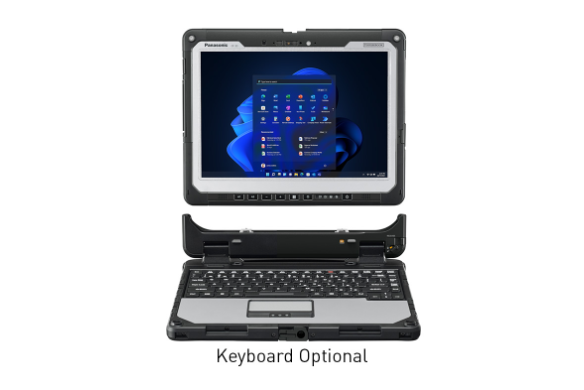
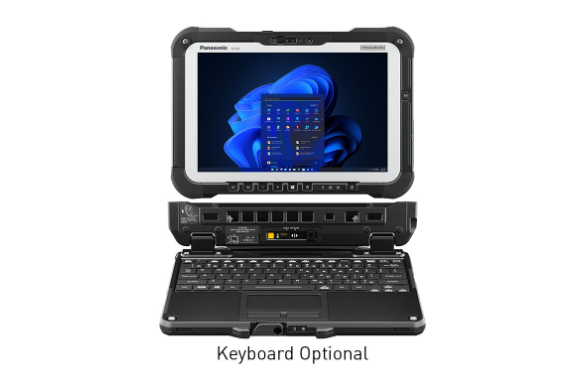
Panasonic TOUGHBOOK 34 fully rugged 2-in-1 laptop and tablet, front view with the tablet detached above its keyboard base. Caption: Keyboard Optional.

When comparing rugged 2-in-1 devices, consider:

  • How easily the keyboard attaches and detaches
  • Rugged protection when the tablet is used independently
  • Weight, balance, carrying options, and ergonomics
  • Available ports, docks, mounts, and accessories
  • Battery configuration and hot-swappable options
  • Display, touch, pen, and keyboard performance
  • Processing, connectivity, and security requirements 

Beyond Ruggedness: What Other Features Matter in Rugged Laptops and Tablets?

Durability and form factor are only part of the decision. Rugged laptops and tablets must also support the applications, connectivity, security, usability, and lifecycle requirements of employees and IT teams.

When comparing rugged devices, consider:

  • How employees will connect to networks, tools, and peripherals
  • Whether the display and controls remain usable in the field
  • Which cybersecurity and compliance requirements apply
  • Whether performance can be sustained across operating environments
  • How the device will be deployed, supported, repaired, and refreshed
  • Its total cost of ownership (TCO) over the planned lifecycle
Cell tower with signal waves representing device connectivity options

What Connectivity Options Should Rugged Laptops and Tablets Support?

Field employees may move among cellular, Wi-Fi, private networks, vehicle systems, and wired connections throughout the day. Rugged laptops and tablets should provide reliable access to applications, data, communications, and connected tools wherever work happens.

Depending on the workflow, connectivity options may include:

  • 5G, Wi-Fi, private LTE, and dual-SIM capabilities
  • Ethernet and other wired network connections
  • Bluetooth for scanners, sensors, printers, and other peripherals
  • GPS for location-based applications and fleet workflows
  • Vehicle docks and antenna pass-through connections
  • USB, USB-C, serial, video, audio, and other required ports

Multiple connectivity options can help employees remain productive when one network or connection method is unavailable.

Handheld device with keypad representing usability in the field

How Should Rugged Devices Support Field Usability?

A rugged laptop or tablet must remain easy to use in the environment where the work takes place. Employees may need to read information outdoors, enter data while wearing gloves, carry the device between locations, or operate it inside a vehicle.

Important usability features may include:

  • Sunlight-readable displays
  • Touchscreens designed for finger, pen, wet-touch, or gloved use
  • Keyboards suited to the amount of data employees enter
  • Handles, straps, cases, and carrying accessories
  • Vehicle and desktop docks
  • Cameras, microphones, speakers, and controls suited to the environment
  • Ports and accessories that support specialized workflows

Buyers should evaluate usability with input from the employees who will use the rugged devices every day.

Shield with check mark representing device security and compliance

What Cybersecurity and Compliance Features Should Rugged Devices Have?

Rugged laptops and tablets frequently operate outside controlled office environments, increasing exposure to theft, tampering, unauthorized access, and data loss. Security should be considered from device procurement and deployment through daily operation and retirement.

Depending on organizational requirements, buyers should look for:

  • TPM, secure boot, BIOS, and firmware protections
  • Smart card, CAC, fingerprint, contactless, or other authentication options
  • Encryption and FIPS-validated components when required
  • Zero Trust and endpoint-security support
  • Remote device management, recovery, and data-protection capabilities
  • TAA compliance for applicable government procurement
  • Operating-system and application support aligned with IT standards
Gauge representing performance in extreme environmental conditions

Why Do Thermal Performance and Environmental Resilience Matter?

Rugged computers may need to run diagnostics, analyze data, process large files, or support AI-enabled applications in hot vehicles, cold outdoor locations, dusty facilities, and other demanding environments.

When evaluating thermal and environmental performance, consider:

  • Documented operating- and storage-temperature ranges
  • Consistent performance during extended use
  • Performance under heat, cold, humidity, and changing conditions
  • Protection against dust, moisture, shock, and vibration
  • Processor, memory, storage, and graphics requirements
  • Testing that reflects how and where the device will be used

A rugged laptop or tablet should provide the required processing performance throughout its documented operating environment—not only under controlled office conditions.

Stacked banknotes representing lifecycle value and total cost of ownership

How Do Lifecycle Value and Total Cost of Ownership (TCO) Affect the Decision?

The purchase price of a rugged laptop or tablet represents only part of its total cost of ownership (TCO). Buyers should also consider how long the device will remain in service, how often it may fail, and what it will cost to deploy, support, repair, and eventually replace.

Total cost of ownership (TCO) considerations include:

  • Warranty coverage and accidental-damage protection
  • Documented reliability and annual failure rates
  • Repair and replacement turnaround
  • Battery, storage, and component replacement options
  • Compatibility with existing docks, chargers, mounts, and accessories
  • Product availability and platform stability
  • Imaging, kitting, deployment, installation, and management costs
  • IT support and employee downtime

A rugged device that remains in service longer and requires fewer repairs may deliver a lower total cost of ownership (TCO) than a less expensive computer that must be replaced more frequently.

Rugged Laptop and Tablet Buyer’s Checklist

Before selecting rugged laptops or rugged tablets, bring IT, operations, procurement, security, and end users together to define the requirements. Use this checklist to compare devices and ensure the final configuration supports the complete workflow.

  • What operating conditions must the device withstand?

  • Which MIL-STD tests, IP rating, drop rating, and operating-temperature range are required?

  • Does the workflow require a rugged laptop, rugged tablet, or rugged 2-in-1?

  • How much keyboard entry, touch interaction, pen input, or hands-free use does the job require?

  • Which operating systems and applications must the device support?

  • What imaging tools, including driver packages, simplify developing and maintaining an operating system image for each rugged or fully rugged laptop, tablet, or 2-in-1?

  • What processing, memory, storage, and graphics capabilities are needed?

  • Which ports, peripherals, scanners, readers, cameras, sensors, and accessories must connect?

  • Which networks and connectivity methods must the device support?

  • Will the device be mounted or docked in a vehicle, office, shop, or temporary workstation?

  • How long must the battery last, and are hot-swappable or user-replaceable batteries necessary?

  • What available warranties/services offerings would benefit the overall support and sustainability of rugged or fully rugged laptops, tablets, and 2-in-1s?

  • What field support is available for rugged or fully rugged laptops, tablets, and 2-in-1s?

  • Which cybersecurity, authentication, encryption, compliance, and procurement requirements apply?

  • How will the devices be configured, imaged, installed, deployed, managed, repaired, and replaced?

  • What is the vendor’s documented annual failure rate and repair turnaround?

  • How long is the expected lifecycle, and which existing accessories must remain compatible?

  • What costs could arise beyond the initial purchase price?

  • What is the device’s projected total cost of ownership (TCO)?


    A complete evaluation can help organizations select rugged laptops and tablets that fit the job today while supporting productivity, security, and lifecycle goals over time.

TOUGHBOOK: The Industry Standard for Rugged Laptops and Tablets

Panasonic TOUGHBOOK® rugged laptops and tablets are designed for mobile work across public safety, utilities, transportation, manufacturing, automotive diagnostics, field service, construction, government, and other demanding environments.

Explore fully rugged laptops and tablets, rugged laptops, 2-in-1 devices, and configurable solutions designed to support different workflows, environments, applications, and IT requirements.

Rugged Laptop and Tablet FAQs

  • A rugged laptop or tablet is designed and tested to withstand defined physical and environmental stresses. Buyers should review documented MIL-STD testing, IP ratings, drop ratings, operating-temperature ranges, construction, and available test results rather than relying on the word “rugged” alone.

  • Fully rugged devices are generally designed for more severe weather, rough handling, drops, dust, water, vibration, and temperature extremes. Rugged devices provide greater durability than conventional business computers but may prioritize mobility, modularity, ports, and performance over maximum environmental protection.

    Because category definitions vary, buyers should compare the documented specifications and test results for each model.

  • Choose a rugged laptop for keyboard-intensive work, extensive peripheral connections, and a traditional PC experience. A rugged tablet may be better for touch-first work and maximum mobility, while a rugged 2-in-1 can support employees who need both tablet and laptop functionality.

    The right choice depends on the applications, environment, data-entry requirements, accessories, and working conditions associated with the job.

  • MIL-STD-810H provides laboratory test methods for evaluating equipment under environmental stresses such as shock, vibration, temperature, humidity, altitude, rain, sand, and dust. It does not mean every device underwent every test, so buyers should ask which methods and procedures were performed and whether documentation is available.

  • Rugged laptops and tablets generally cost more upfront, but purchase price represents only part of total cost of ownership (TCO). Buyers should also consider repairs, replacements, downtime, IT support, accessory compatibility, deployment expenses, and the expected device lifecycle.

    A rugged device that remains in service longer and requires fewer repairs may deliver a lower total cost of ownership (TCO) than a less expensive computer that must be replaced more frequently.

  • The expected lifecycle depends on usage, environment, configuration, maintenance, application requirements, and vendor support. Buyers should evaluate platform availability, repair services, battery replacement, accessory compatibility, security updates, and annual failure rates—not only the original warranty period.

  • Security requirements vary by organization and deployment. Buyers may need hardware-backed security, encryption, secure boot, TPM, multifactor authentication, endpoint protection, remote management, and FIPS-validated components.

    Government buyers should also confirm applicable compliance and procurement requirements, including TAA when required.

  • A hot-swappable battery system allows a depleted battery to be replaced while the device remains powered by another battery or bridge battery. This can help employees continue working without shutting down applications or returning to a charging station during long shifts.

* Required.